
What does a POS app for a small business really need?
It needs to be fast at the counter, honest about the cash, and clear for the owner. A long feature list matters less than whether a new cashier can ring up a customer during a rush without asking for help.
Start from your own day. Where do you lose money or time today: mismatched cash, stock that runs out unnoticed, or not knowing the takings until night? Pick the features that fix those problems first.
Why should a POS app keep working without internet?
Because the connection in a shop is rarely perfect, and a register that freezes costs you sales. An offline-first POS stores every sale on the device itself and keeps selling when the internet drops.
When the connection returns, the app syncs in the background to the server, so reports and the owner's view catch up on their own. Ask how it handles two devices selling the same item while offline, and what happens to a half-finished sync.
Which printer, cash drawer and barcode scanner work with a POS app?
Most small shops use a thermal receipt printer, connected by Bluetooth or USB, that speaks ESC/POS, the common command language for receipt printers. Check the exact printer model before you buy, because paper width and Bluetooth behaviour differ between brands.
A cash drawer usually connects to the printer and opens when a cash sale is printed. Barcode scanners are simpler: many act like a keyboard, so the app just reads what they type.
- Receipt printer: Bluetooth or USB thermal, ESC/POS
- Cash drawer: opens through the printer on cash sales
- Barcode scanner: acts like a keyboard, or use the phone camera
- Tablet or phone: sturdy, with a stand and a charger at the counter
Which payment methods should a POS app support?
At minimum: cash, QRIS and bank transfer, plus split payment when a customer pays part in cash and part by QR. QRIS is now normal even in small warungs and stalls.
Be clear about what the app does and does not do. Recording that a sale was paid by QRIS is one thing; confirming the money arrived through a payment provider is another and needs a proper integration. Ask which one you are getting, and make sure the cash change is calculated for you.
How should a POS handle stock, wholesale prices and member discounts?
Stock should go down automatically with every sale and warn you before an item runs out. A low-stock alert per product, with your own threshold, beats an inventory module you will never fill in.
For shops that sell to both walk-in customers and resellers, the app should switch to the wholesale price by quantity or by customer group. Member prices and discounts should apply automatically, not depend on the cashier remembering. Add a stock count to correct numbers after a physical check.
How do shifts, staff roles and reports keep the cash honest?
A shift open and close with a cash count shows exactly when and where a difference appeared. The cashier enters the starting cash, counts the drawer at the end, and the app compares it with what the sales say it should be.
Staff roles keep the rest in check. A cashier can sell, but only a manager can void a sale, change a price or see the full reports.
- Daily report: sales by payment method, by product and by cashier
- Void and discount log with who did it and when
- Owner app: today's sales and low stock from your phone, wherever you are
- Approvals: a large void asks the owner before it goes through
Should you use a ready-made POS subscription or build a custom one?
For many shops a ready-made POS is the right choice. It is quick to start, someone else maintains it, and it already works with common printers.
A custom POS starts to make sense in a few situations. Your workflow is unusual, such as made-to-order items, weighed goods or a special pricing rule. You need to connect it to an accounting tool, a marketplace or your own system. You run several outlets and want one view of all of them. Or you want to own your sales data and decide how it is stored.
Custom also means more up-front work and your own maintenance plan. Ownership of code and accounts depends on what is agreed in the contract.
Checklist
Checklist before you choose or brief a POS
- Write down the three problems the POS must fix first
- Confirm the app keeps selling offline and syncs later
- Check your receipt printer model (Bluetooth or USB, ESC/POS)
- List the payment methods you accept, including QRIS and split
- Decide the low-stock threshold for your top products
- Note wholesale and member price rules, if any
- Define staff roles: who can void, discount and see reports
- Plan the shift close and cash count routine
- Decide if you need an owner app, and for how many outlets

Try the demo
See it working before you brief us
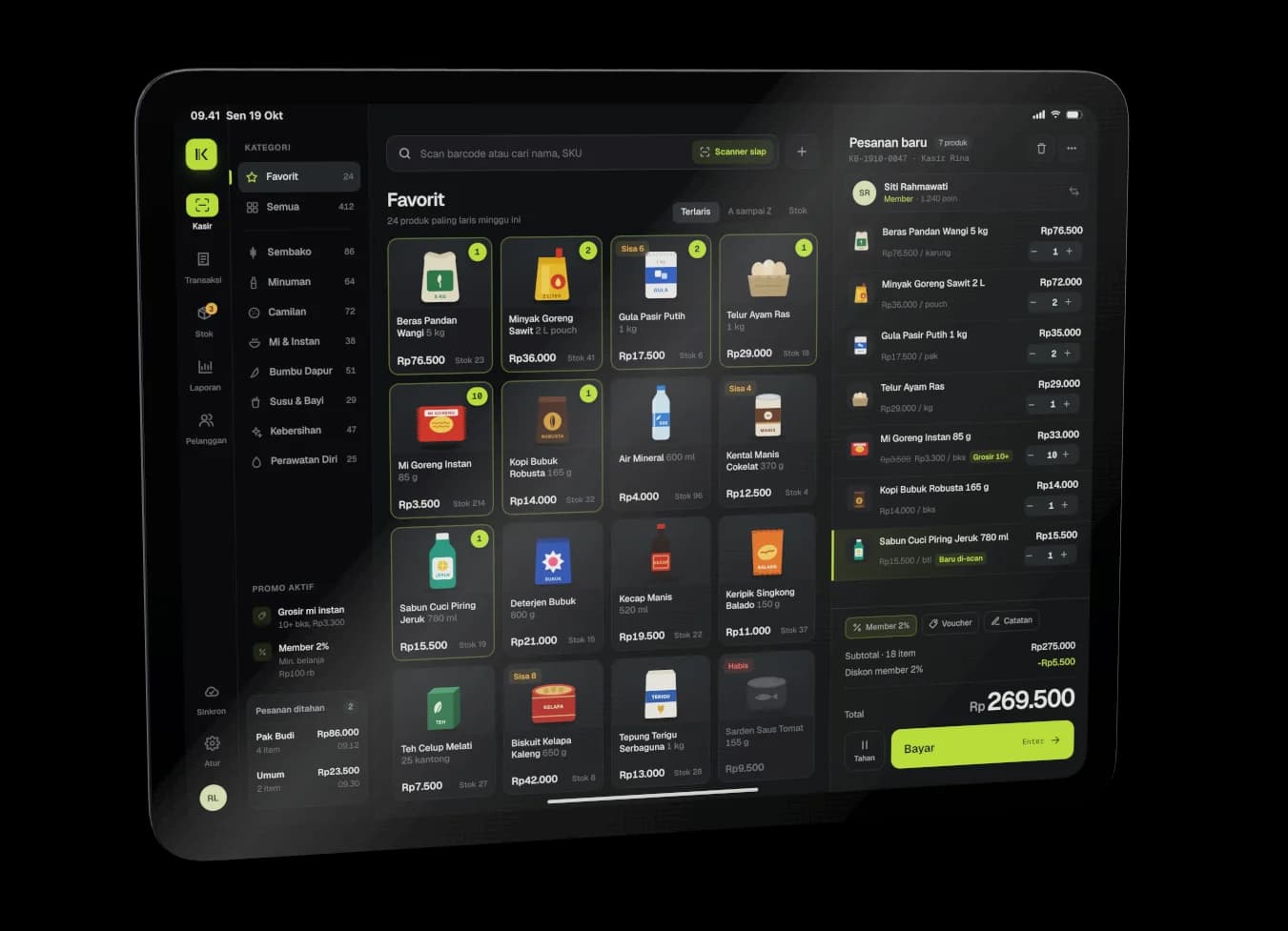
Kasirku. Open Kasirku to see an iPad register with barcode scan, wholesale and member prices, split payment, shift close and an owner app. It is a demo we built, not a client project.
Quick questions
Can I use my phone or tablet as the register?
Yes. A phone or tablet with a Bluetooth printer is enough for many small shops. Pick a device that stays charged, and keep a stand or case at the counter.
Does QRIS work in a POS app by itself?
Showing a QR code and recording the payment is the basic version. Automatic confirmation that the money arrived needs an integration with a payment provider, so ask which one the app offers.
When does a custom POS pay off?
When a ready-made one cannot follow your workflow, cannot connect to the tools you use, or cannot cover several outlets in one view. If none of that applies, a subscription is usually simpler.
Related services
- Custom POS and Cashier App Development for Small Businesses in Pontianak, IndonesiaCustom POS apps for shops, cafés and distributors, with offline selling, receipt printing and daily sales on the owner's phone.
- Custom Apps for Small and Medium Businesses in Pontianak, IndonesiaCustom apps for small and medium businesses, starting from the daily problem that hurts most.
- AI Chatbot and AI App Development for BusinessAI features and chatbots inside your app or website, answering from your own business data.
- E-commerce Website and Online Store DevelopmentCustom online stores and e-commerce websites with payments, shipping and stock that syncs with your cashier.